OpenShot 3.2.0 Introduces New Themes, Enhanced Timeline Features, and Performance Improvements
| Shelf | Photo Techniques |
|---|---|
| Date in | |
| Readers | 497 |
OpenShot 3.2.0 brings innovative themes, practical features, and performance enhancements for a streamlined video editing experience across all platforms.
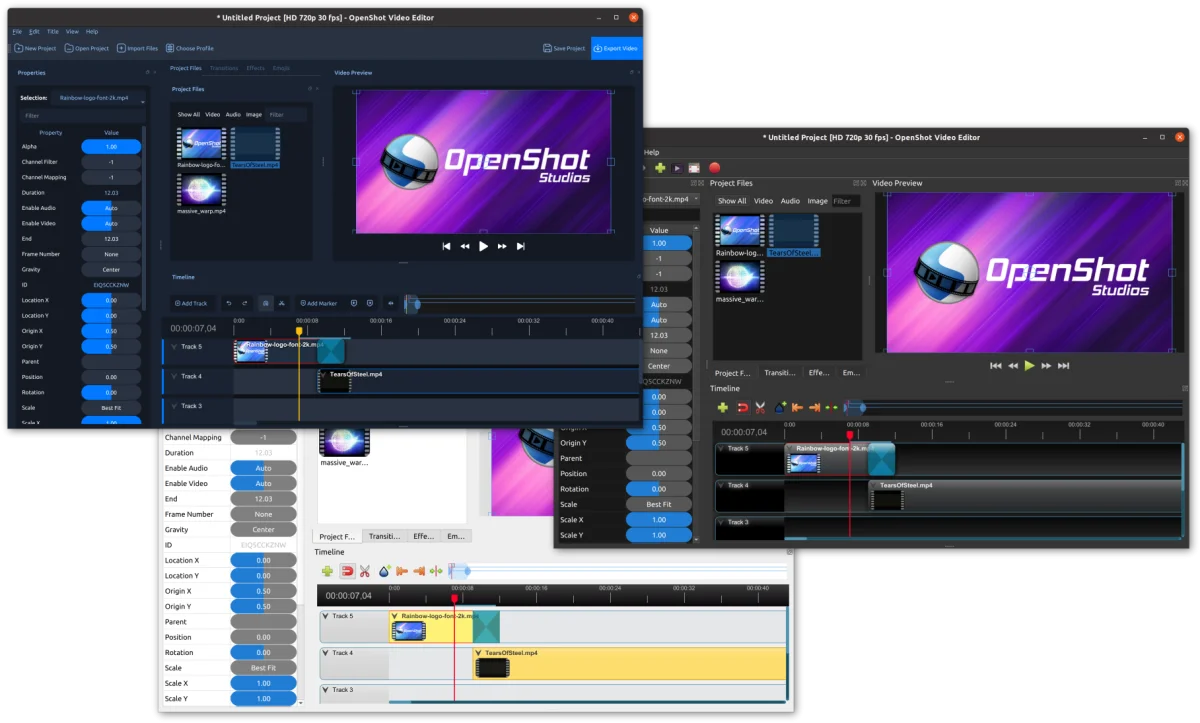
OpenShot Video Editor has just released version 3.2.0, heralding a new era in free and open-source video editing. This latest update showcases a blend of stunning themes and significant functional improvements, delivering an intuitive and robust editing experience for users on Linux, Mac, Windows, and Chrome OS. If you're looking to elevate your video editing process, it’s time to dive into this exciting release!
Key Highlights of OpenShot 3.2.0:
- Complete overhaul of themes, featuring the new Retro and Cosmic Dusk themes.
- Enhanced timeline snapping capabilities for improved clip alignment.
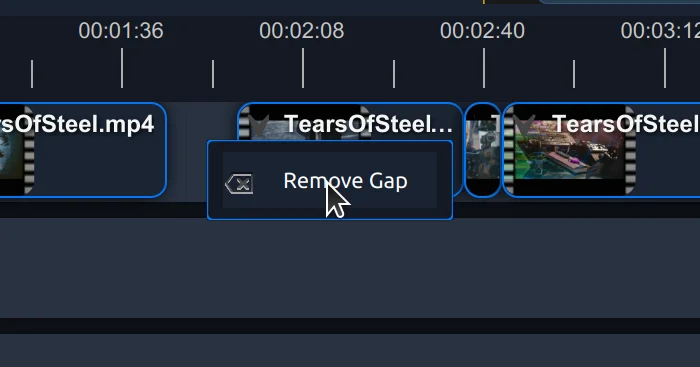
- Introduction of the Remove Gap feature that simplifies removing spaces between clips.
- Refined functionalities for splitting clips and previewing in the timeline.
- New icons for the playhead and markers to standardize across all themes.
- Support for Blender 4.1 resulting in better animation integration.
- Option to use friendly names for files on the timeline, improving workflow clarity.
- Improved stability with Undo/Redo functionality, making it more reliable.
- Enhanced support for high DPI displays for clearer visuals.
- Improved object detection and tracking features for complex editing tasks.
- Various bug fixes and compatibility improvements for modern distributions.
Exploring the New Themes
The introduction of the Cosmic Dusk theme is one of the standout features of this release. Design enthusiasts will appreciate the thoughtful UI updates, including new toolbar placements, modernized icons, and a more efficient timeline layout. This theme is currently in a preview stage, actively seeking user feedback to further refine its design and usability. Users can easily switch to this theme through the Preferences menu to experience its fresh aesthetics firsthand.

Say Goodbye to Gaps
One of the most welcome improvements is the newly implemented Remove Gap feature. By right-clicking on any gap between clips, users can now eliminate unwanted spaces with a single click, streamlining the editing process. This functionality not only saves time but also reduces the potential for error compared to the previous manual method of dragging clips. Furthermore, users can select Remove All Gaps directly from the track to tidy their timeline in one go.
Performance and Usability Enhancements
This release focuses heavily on enhancing overall performance and usability. Major improvements have been integrated into the undo and redo functionalities, ensuring a more stable experience during complex editing sessions. Also noteworthy is the revamped support for high DPI displays, which offers sharper visuals on a wider range of screens.
Additionally, users will find the timeline more intuitive thanks to updated property editors and clearer handling of fonts within the Title editor. The new capability of using friendly names for timeline files aims to make the editing process more organized.
Community Engagement and Support
OpenShot thrives on community involvement, and this update opens doors for users to contribute. Whether by providing feedback on new features or participating in discussions, the OpenShot project is built on collaboration. To support ongoing development efforts, users are encouraged to make a donation, which helps sustain continuous improvements. Donors will be recognized on the OpenShot website, showcasing the community's critical role in the app's growth.
Enhanced Documentation and Future Improvements
This release also includes a significant update to the User Guide documentation, aimed at better supporting both users and developers. This improvement reflects an effort to streamline user experiences and expand knowledge, ensuring that both longstanding users and newcomers can make the most of OpenShot’s powerful features. Furthermore, experimental Java bindings have been introduced, setting the stage for potential future integration across various platforms.
Full Changelogs and Additional Resources
For a deep dive into all the specific changes made in this release, users can reference the full changelogs available for the different components of OpenShot:
- openshot-qt Changelog (Version: 3.2.0)
- libopenshot Changelog (Version: 0.3.3)
- libopenshot-audio Changelog (Version: 0.3.3)
- Trello Release Board (for further details and discussions on the development process)
Get Involved!
OpenShot invites enthusiasts and professionals alike to join its community. Your contributions, whether in the form of ideas, feature testing, answering questions, or tutorial sharing, are invaluable. To connect with fellow users and developers, consider joining our Discord channel and take part in shaping the future of this extraordinary video editing software.
Through dedication and collective effort, OpenShot 3.2.0 stands poised to transform how we approach video editing, enabling creators to unlock their full potential, one clip at a time.