ON1 Photo RAW 2025.2: Enhanced Editing Tools and Faster Workflows
| Shelf | Cameras & Lenses |
|---|---|
| Date in | |
| Readers | 873 |
The ON1 Photo RAW 2025.2 update introduces advanced features for streamlining edits, empowering photographers with smart tools for improved productivity.
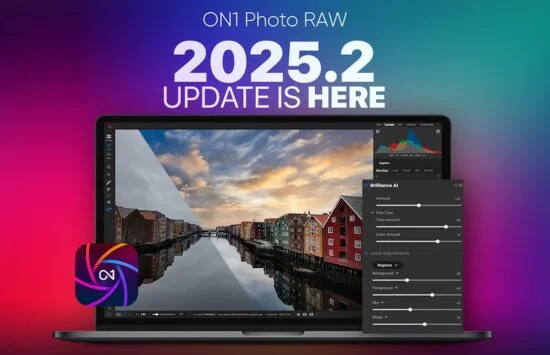
ON1 has launched the 2025.2 update, enhancing its Photo RAW software suite for both desktop and mobile users. This update is available at no cost for existing users of version 2025 and subscribers. Below are the key enhancements introduced in this release.
Key Features in ON1 Photo RAW 2025.2
Auto Crop
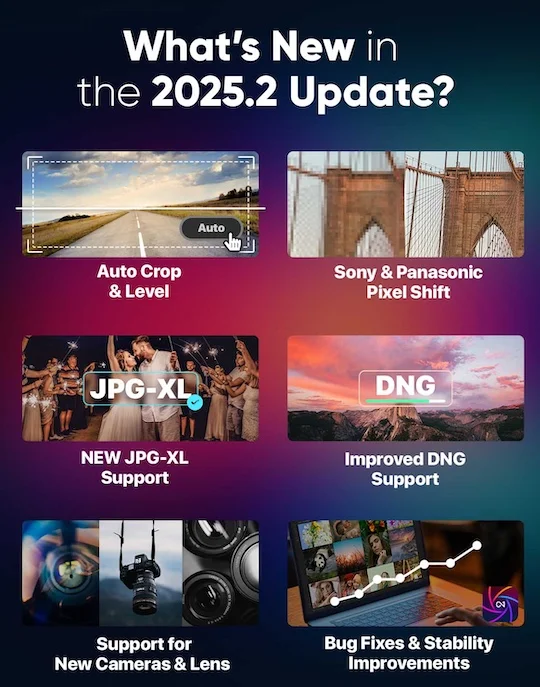
The new Auto Crop feature is a significant addition that automatically adjusts your image composition to your selected aspect ratio while preserving essential subjects. This type of functionality can save you substantial time when editing, especially if you often deal with large batches of images. It supports both individual and batch edits, making it quicker to apply compositional fixes without extensive manual work. It’s about refining your visual narrative, ensuring that important elements remain front and center. For a demonstration, check out the feature here.
Pixel Shift Support for Sony and Panasonic Cameras
The update includes support for pixel shift images produced by Sony and Panasonic cameras. This is a feature that many photographers have been eager to see. It allows users to access and edit ultra-high-resolution composites, providing an avenue to achieve unparalleled detail and image quality. The ability to manipulate high-resolution images opens up possibilities for large prints and detailed editing that can enhance your creative output significantly.
JPG-XL Format Support
ON1 Photo RAW now fully supports the JPG-XL file format, promising smaller file sizes while maintaining high-quality images with 16-bit color and transparency. Integrating JPG-XL is particularly timely, addressing the growing need for efficient file management. Photographers often face issues related to storage and bandwidth, and JPG-XL stands to streamline workflows significantly, making it easier to manage and share their work without sacrificing quality.
Enhanced DNG Compatibility
Improvements to DNG file support also take center stage in version 2025.2, with better handling of the latest compression formats. This is more significant than it looks; modern cameras are increasingly adopting DNG formats for their flexibility and range of use. Enhanced compatibility ensures smoother editing experiences across various camera systems, which is a boon for photographers who deal with diverse file types. The versatility of the software thus expands, catering to a broader user base.
Expanded Camera and Lens Support
ON1 continues to keep pace with technological advancements by expanding its compatibility with new and existing camera models. The update includes support for a range of current models, like the OM System OM-3, Fuji GFX-100RF, and GoPro HERO 13 Black, among others. It’s commendable how the software evolves to meet the demands of both professional and hobbyist photographers alike. The update also introduces lens correction profiles for numerous popular and legacy lenses from brands like Canon, Nikon, and Leica. Users are expected to encounter improved results, effectively correcting lens distortions in portraits, landscapes, and more, which can enhance the final output of their work.
Updates for ON1 Photo RAW for Mobile
Super Select AI Tool
The mobile app has significantly evolved with the introduction of Super Select AI. This addition simplifies the editing process drastically, a welcome change for those who edit on-the-go. Instead of traditional masking or brushing, this tool allows you to tap specific areas in your image for immediate adjustments—be it darkening skies or enhancing colors. It’s designed to streamline the workflow for mobile editors, providing intuitive interaction. The convenience of mobile editing can’t be understated, especially for those who capture images on their phones or tablets.
Updated Curves Filter
The Curves filter has received a makeover, now larger and easier to manipulate. This redesign allows users to make more precise adjustments while keeping the full image visible in the preview. With better visibility, users can better gauge the impact of their edits in real-time, a factor that enhances the editing process. That said, an intuitive interface can significantly reduce the learning curve for new users.
Revamped Masking Toolbar
The Masking Toolbar has been upgraded to include collapsible functionality. This allows users to maximize their preview space when not actively using it. And this is the part most people overlook — an uncluttered workspace can lead to greater focus on the craft itself, freeing mental bandwidth for creativity. This way, the interface remains uncluttered, honing the user’s attention on the photograph until needed.
Obtaining the Updates
If you're an existing user of ON1 Photo RAW 2025, you can access this update for free. Simply launch the application, and it will automatically prompt for updates, guiding you through the installation of version 2025.2. Ensuring users have straightforward access to updates is part of maintaining a strong user base.
The mobile app update has also been submitted to app stores and should be available shortly, pending the usual approval processes in your area.

The enhancements in ON1 Photo RAW 2025.2 reflect a commitment to providing powerful editing tools geared toward both professionals and enthusiasts. With these new features at your disposal, the potential for creativity and efficiency in photo editing receives a significant boost.
Implications and Future Outlook
The introduction of features like Auto Crop and the Super Select AI Tool marks a decisive shift toward user-friendly editing. This could indicate a growing trend where software prioritizes accessibility without sacrificing advanced capabilities. For professionals, it means a faster turnaround and the ability to produce quality work more efficiently. For hobbyists, it makes powerful editing tools accessible and less intimidating. As camera technology continues evolving, so too will the software needed to harness that potential. Keeping this pace in mind, it’ll be interesting to see how ON1 continues to adapt and what new challenges might arise from the integration of AI and increased file types in the editing process.