OpenShot 3.3: Enhanced Video Editing Features and Efficient Workflow Improvements
| Shelf | Photo Techniques |
|---|---|
| Date in | |
| Readers | 855 |
OpenShot 3.3 brings notable upgrades including smarter editing tools and a stunning new theme, enhancing user experience for both beginners and professionals.
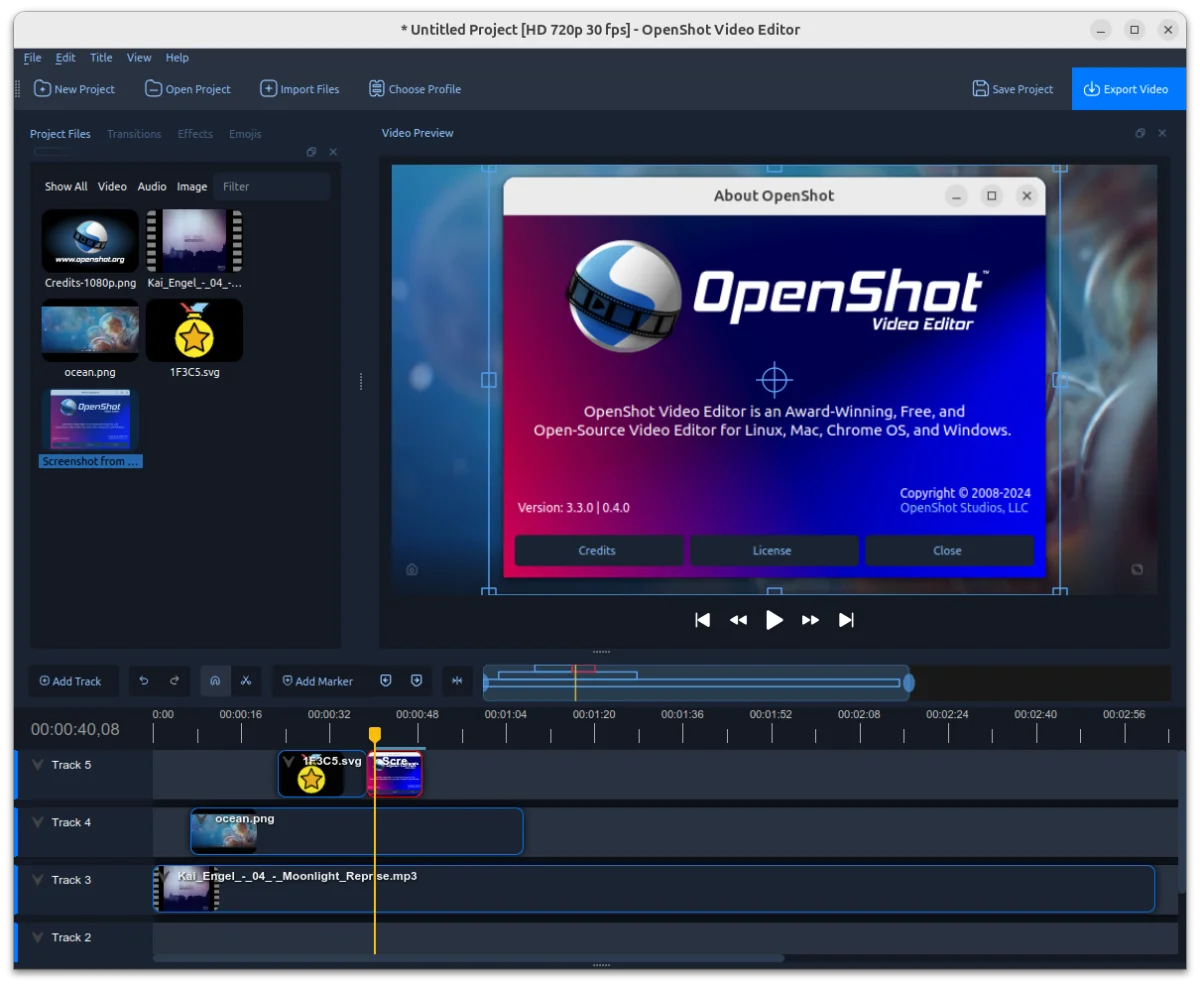
OpenShot 3.3 has officially launched, bringing a host of exciting features designed to enhance your video editing experience. With tools like ripple editing and improved zoom controls, this version not only looks stunning but enhances productivity for editors at all levels. 🌟 The introduction of the new Cosmic Dusk theme adds a modern aesthetic, making the editing interface both pleasing and user-friendly. To experience these changes, download OpenShot 3.3 now and elevate your video projects! 🚀
Highlights and Key Features
- Cosmic Dusk Theme: Enjoy a sleek and contemporary design that modernizes your editing workspace, optimizing usability.
- Enhanced Ripple Editing:
- Precise playhead alignment during ripple slices ensures you can make accurate adjustments to your timeline.
- The ripple slice now allows multi-layer selections, which enables quick and efficient timeline management.
- Utilize ripple delete functions that eliminate gaps while maintaining synchronization across your edits.
- Quickly select all items to the right of your clicked position using the ripple select feature with
Alt+Click. - Streamline your workflow with keyboard shortcuts, like
Shift+Deletefor quick ripple deletion.
- Improved Zoom Controls: Navigate your timeline more accurately with enhancements that support frame boundary banding and draggable selections.
- Multi-File Handling: Drag and drop multiple files with enhanced snapping and swift performance, easing the editing process for large batches of clips.
- Recovery Features: A time-based recovery menu enables you to recover projects directly from auto-saved files, ensuring you never lose important edits.
- Auto-Show Properties: Clicking on effects or keyframes brings up the properties dock automatically, simplifying the editing process.
- Project Profile Matching: Streamline workflows by easily aligning your project profile with imported file formats.
- Advanced Timeline Precision: Define exact edits with frame boundary support that includes alternating color bands for clarity.
The State of OpenShot
This past year has seen remarkable improvements in OpenShot across all major platforms, including Linux, Mac, Chrome OS, Windows, and Cloud services like AWS and Azure. Despite challenges posed by operating system updates such as Windows 11’s audio playback issues and Wayland’s impact on Linux applications, the development team has persevered. The release of OpenShot 3.3 reflects their commitment to providing the best free and open-source video editor in the market. As the team looks toward 2024, they encourage users to support the project through donations, emphasizing the importance of community funding for continued growth and innovation.
Bug Fixes and Performance Enhancements
- Windows 11 Compatibility: Resolved several critical issues concerning audio sync and playback preferences due to the recent Windows updates.
- Linux Color Picker Reliability: The "Pick Screen Color" function has been optimized for reliable usage, assisting in effects such as Chroma Key.
- Export Profile Improvements: Users can expect consistent behavior from dropdowns and selection preferences, eliminating confusion.
- Accurate Playback Navigation: Home and End key functionality has been improved for seamless playhead movement and accurate timeline positions.
- Gap Prevention Techniques: Timeline gaps during snapping and exporting have been mitigated through enforced precision alignment mechanisms.
- FFmpeg Support: Enhanced compatibility ensures stable operation on newer systems with updated FFmpeg versions.
Usability and Quality of Life Enhancements
- Faster Batch Updates: Managing large file imports and updates is now significantly quicker, saving valuable time.
- Improved Undo/Redo: The performance of undo and redo operations has been optimized, particularly in larger projects.
- View Enhancements for Imported Files: Automatically select and center imported files in the Project Files view for ease of access.
- Improved Copy-Paste Functions: Effect copy-pasting has been overhauled to retain unique effects while merging duplicates efficiently.
Get Involved and Support OpenShot
OpenShot thrives on community support and contributions. To enhance capabilities and ensure that OpenShot remains free for everyone, consider making a donation. Donors will receive recognition on the website and in the next version of OpenShot, fostering a sense of community and commitment to open-source video editing. Join our community to participate in discussions, testing, or creating tutorials, even if you're just starting out. Connect with other enthusiasts by joining our Discord today!
Special Thanks
Thanks go out to the dedicated community members who consistently engage and assist with key issues. Special recognition to Raffi for tirelessly supporting users and advocating for community-requested solutions, helping to make OpenShot better for everyone!
For Detailed Updates
Discover full changelogs and further details on the development of OpenShot 3.3:
- openshot-qt Changelog (Version: 3.3.0)
- libopenshot Changelog (Version: 0.4.0, SO: 27)
- libopenshot-audio Changelog (Version: 0.4.0, SO: 10)
- Trello Release Board for discussions and additional insights on 3.3 development.