Latest Feature Updates from Luminar, ON1, and DxO for Photography Enthusiasts
| Shelf | Cameras & Lenses |
|---|---|
| Date in | |
| Readers | 313 |
Explore new features and offerings from Luminar, ON1, and DxO that enhance photo editing capabilities and support for various cameras and lenses.

Enhancements of Luminar Neo
Luminar continues to evolve its offerings with significant upgrades to Luminar Neo, enhancing the user experience with advanced features aimed at both amateur and seasoned photographers. The recent updates exemplify the balance between user-friendliness and powerful editing functionality, reflecting the software's intent to appeal to a broad audience. Notably, users can expect three powerful upgrades:
- Restoration Tool: A single-click solution designed to revive old or damaged photographs. This feature is particularly useful for restoring family memories or vintage prints that show signs of wear such as deep scratches or faded colors. The tool's intuitive design means that even those without advanced editing skills can see their cherished images come back to life.
- AI Assistant: This intelligent tool acts as a guide by analyzing images and recommending optimal edits. It’s an excellent resource for beginners and professionals alike, simplifying access to advanced features like Develop Raw, Curves, and Color Harmony. What stands out here is that it doesn't just automate the editing process; it educates users, allowing them to learn while they edit.
- Volume Feature: This enhancement lets users add depth and dimensionality to images effortlessly by improving light and shadow. This tool elevates contrast and visual impact without the need for manual Dodge & Burn techniques. The implications for photographers are significant; by reducing the technical load of image editing, it fosters creativity over technicality—an attractive advantage for many.
New Pricing Strategies for Users
This September, Luminar is also offering new purchasing options for users:
- New Users:
- Luminar Neo Cross-device Perpetual License (includes Luminar Neo + Luminar Mobile) priced at $159. This package addresses the need for flexibility, allowing users to edit seamlessly across different devices.
- Luminar Neo Max Perpetual License (includes everything from the Cross-device package plus a Creative Library) available for $179. Including a Creative Library not only broadens the toolkit but also enhances workflow for users who want a more comprehensive editing solution.
- Existing Users:
- Ecosystem Pass (Generative tools, New tools, Luminar Mobile, Web Galleries, and Cross-device editing) at $79. This offers an affordable way for current users to access the full capabilities of the new software, reflecting an understanding of the loyalty of existing customers.
- 2025/26 Upgrade Pass (includes Generative tools and New tools) available for $59. This pricing is strategic; it keeps existing users engaged and encourages them to stay within the Luminar ecosystem.
ON1's Photo RAW 2026 Updates
Shifting focus to ON1, the company has announced the release of Photo RAW 2026, which introduces several significant enhancements to its photo editing software. The updates reflect a keen awareness of the challenges modern photographers face, particularly in terms of precision and efficiency:
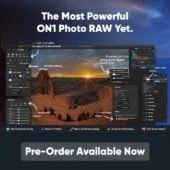
- Masking Overhaul: This includes improvements such as Mask Layers, one-click Subject/Background masks, and cleaner AI edges allowing for precise selections and adjustments. The push for more intuitive masking tools addresses a common pain point for photographers, who often find such tasks time-consuming and tedious.
- Effects Upgrades: The software has enhanced its Favorites and search functions in the Add Filter section, along with starting point presets and four new creative filters. This change adds a layer of customizability that allows users to tailor their experience more closely to their creative vision.
- Built-In Resize AI: The latest version features next-gen super resolution and noise handling, effectively eliminating the need for separate apps or plugins for resizing images. This all-in-one approach not only streamlines workflows but also reduces the dependence on external software, a concern many photographers have raised.
- Additional Features: These include Negative Mode for film scans, support for grayscale images, better perspective tools, and a flexible user interface that allows for customizable workflows. It’s a thoughtful array of tools, especially for those who still value traditional film photography in a digital context.
DxO Labs' Continuous Updates


Moving on to DxO Labs, they have rolled out updates to several products that enhance camera and lens support:
- DxO PhotoLab 9 and DxO PureRAW 5.3 are now available. The updates bring improved algorithms for better image processing. By staying updated with the latest camera models, DxO ensures that professionals can achieve high-quality results regardless of their equipment.
- New camera and lens support has been added, which includes high-demand models like:
- Canon PowerShot VI
- DJI Mavic 4 Pro
- Fuji GFX series
- Nikon Coolpix P1100
- Panasonic S1 and S1 II
- OM System OM 5
- Several lenses including notable entries such as the Canon RF 20mm F1.4 L VCM and the Sigma 50mm F1.2 DG DN A (Sony FE). The breadth of compatibility with prevalent gear signals DxO's commitment to enhancing the capabilities of its users.
- The new DxO Modules integrate across many of their software applications:
Implications for Photographers
With these various updates, Luminar, ON1, and DxO are providing photographers and filmmakers with enhanced tools to improve their creative workflows. Each software aims to streamline the editing process while offering powerful capabilities that accommodate a range of user needs and expertise. For photographers, this means more options than ever for delivering polished, professional results. More options can also create a paradox; while increased functionality is enticing, it can lead to overwhelm for those who aren't as tech-savvy. If you're working in this space, you should consider which tools genuinely address your workflow needs versus those that seem flashy but may complicate your process.
For those invested in maximizing their photographic potential, these updates indicate a strong push towards smarter editing solutions and broader equipment compatibility, paving the way for more polished results and satisfied users. Each company is keenly aware of audience needs—from easy restoration techniques to precision in editing—indicating the developers’ commitment to user-centered design principles. That said, what remains to be seen is how these updates will be received by the community and whether they can hold their own against competitors in a market that's not only saturated but continuously shifting.