Discover OpenShot 4.0: Advanced Recording, Editing, and Color Grading Tools
| Shelf | Cameras & Lenses |
|---|---|
| Date in | |
| Readers | 753 |
OpenShot 4.0 elevates video editing with screen recording, advanced color grading, and a suite of new effects, making it easier for creators to enhance their workflow.
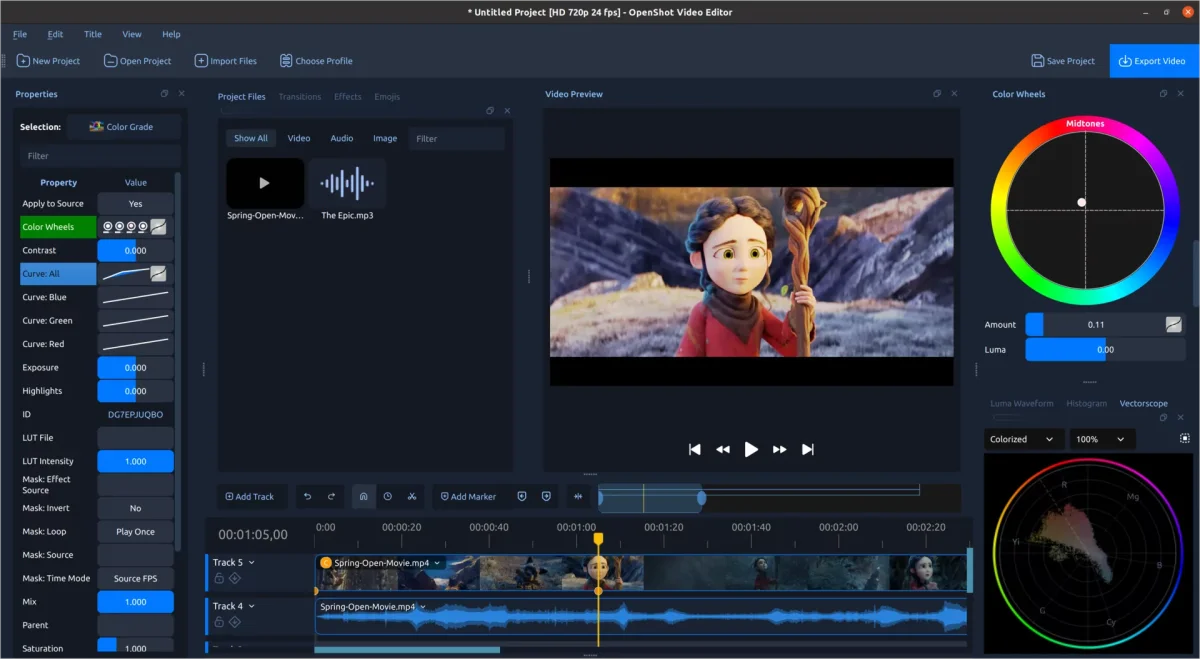
OpenShot 4.0 has launched with a series of impactful upgrades, transforming how users engage with video editing. This release introduces capabilities including direct recording of screen, webcam, microphone, and system audio integrated into your projects. Additionally, enhanced color correction tools, AI-powered subject isolation, and a variety of new effects empower creators to realize their visions more efficiently and effectively than ever.
Key Features of OpenShot 4.0
- Revamped Color View: An intuitive interface for color correction with presets, color wheels, curves, LUTs, and precision video scopes.
- Enhanced Recording View: Capture and edit audio and video from multiple sources directly within the app.
- Ten New Effects: Generate animated visuals, dynamic film styles, and other exciting effects for enhanced creative expression.
- Local AI Masks: Isolate subjects using downloadable models that operate locally, without needing cloud services.
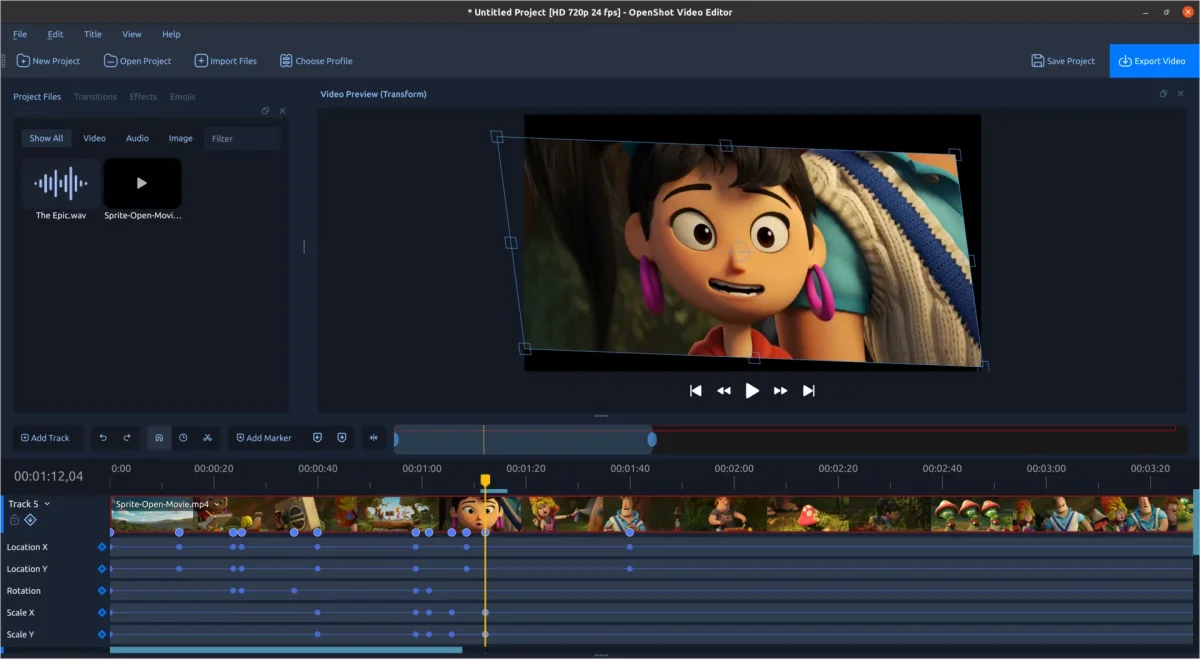
- Refined Native Timeline: An improved timeline offering smoother interactions and increased visibility into clip properties.
- Improved Performance: Speed enhancements across effects and editing workflows, including faster rendering and smoother operations.
- Intuitive Workflows: Streamlined menus and presets for simpler access to color grading, animation styles, and audio options.
- Updated Foundation: Enhanced support for modern operating systems, including plans for future Android compatibility.
Introduction of the New Color View
Color plays a vital role in storytelling, and OpenShot 4.0 centralizes color correction and grading in its new Color View. This feature displays a large video preview alongside adjustable color parameters, providing users with simplified yet powerful tools to enhance their footage.
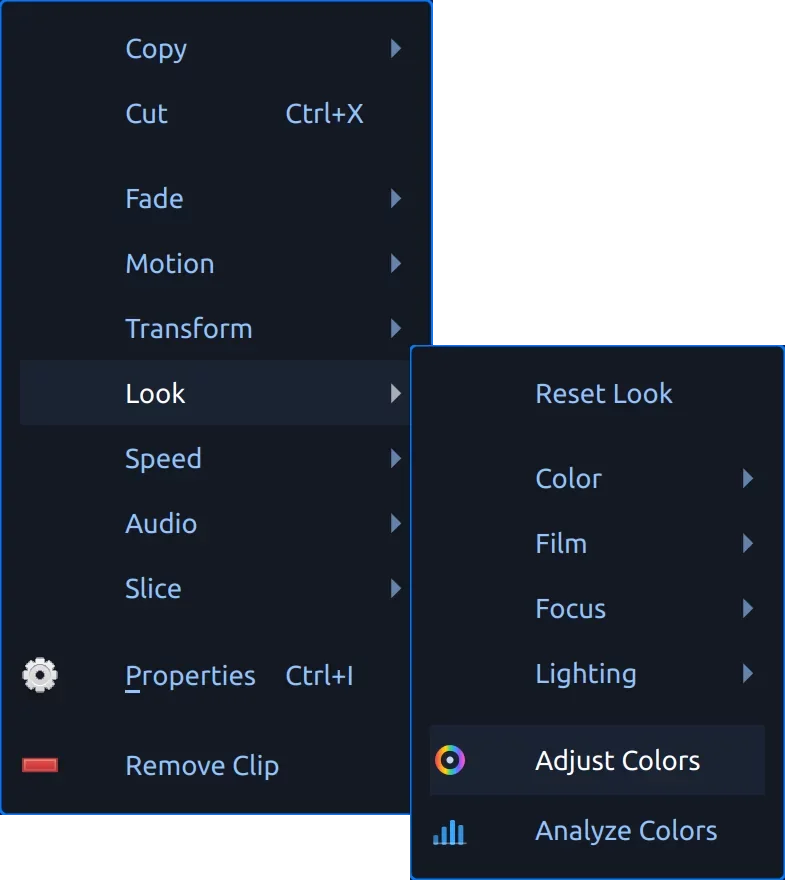
To get started, right-click on any video clip and select Look > Adjust Colors. This action adds the new Color Grade effect to your timeline, unlocking a suite of controls ranging from basic adjustments to advanced color manipulation.
Comprehensive Color Correction and Grading
The Color Grade effect comes with essential parameters, allowing adjustments for exposure, contrast, temperature, tint, and saturation. You can correct problems such as underexposed shots or inconsistencies between multiple camera sources.
For users looking to create stylistic hues, the effect includes color wheels for the control of global adjustments, shadows, midtones, and highlights. This allows more nuanced modifications, such as cooling the shadows and warming the highlights to evoke specific moods or emphasize subjects effectively.
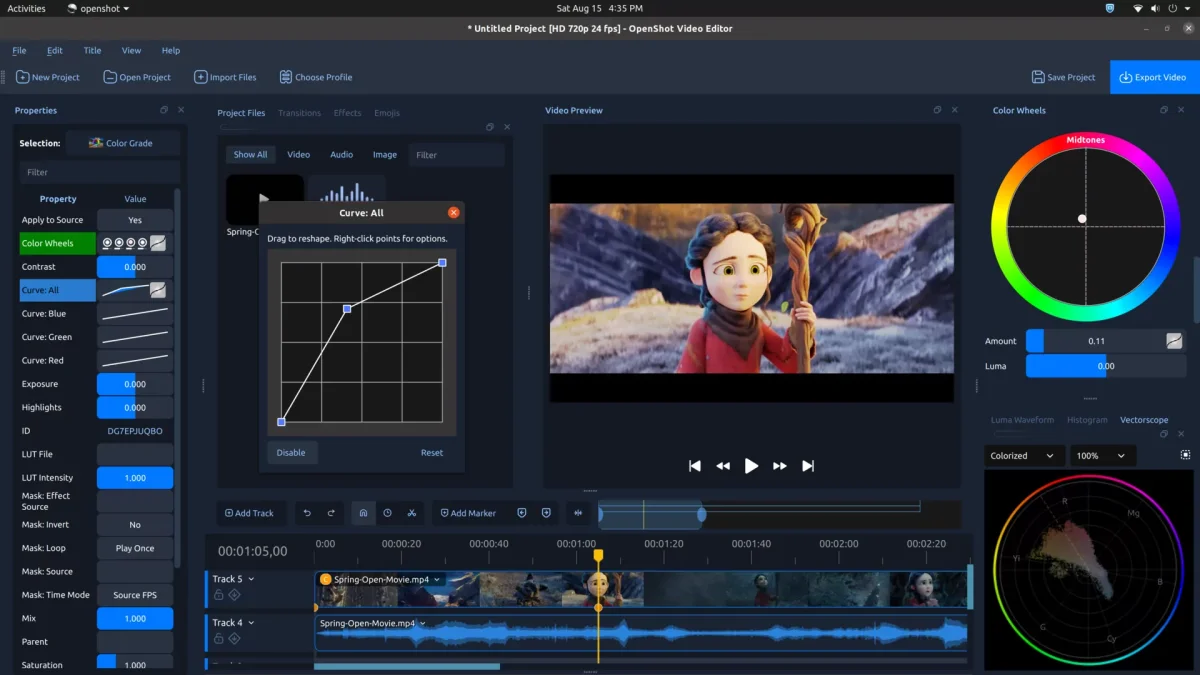
The included four editable curves offer a high degree of precision on overall and channel-specific adjustments for red, green, and blue. Users can manipulate curve points and handles directly, using Bézier curves for smooth transitions. Moreover, OpenShot 4.0 now supports industry-standard .cube LUT files, enabling users to blend various looks meticulously.
Notably, the Color Grade effect is keyframable, allowing users to animate changes, adjust for shifting lighting conditions, or develop dynamic color transitions that enhance visual storytelling across clips.
Understanding Your Image with Video Scopes
Monitors often provide a distorted view based on lighting and settings; however, OpenShot 4.0 integrates Luma Waveform, Histogram, RGB Parade, and Vectorscope tools to give an accurate view of color and brightness data. This allows editors to judge exposure, analyze color channels, and ensure natural skin tones.
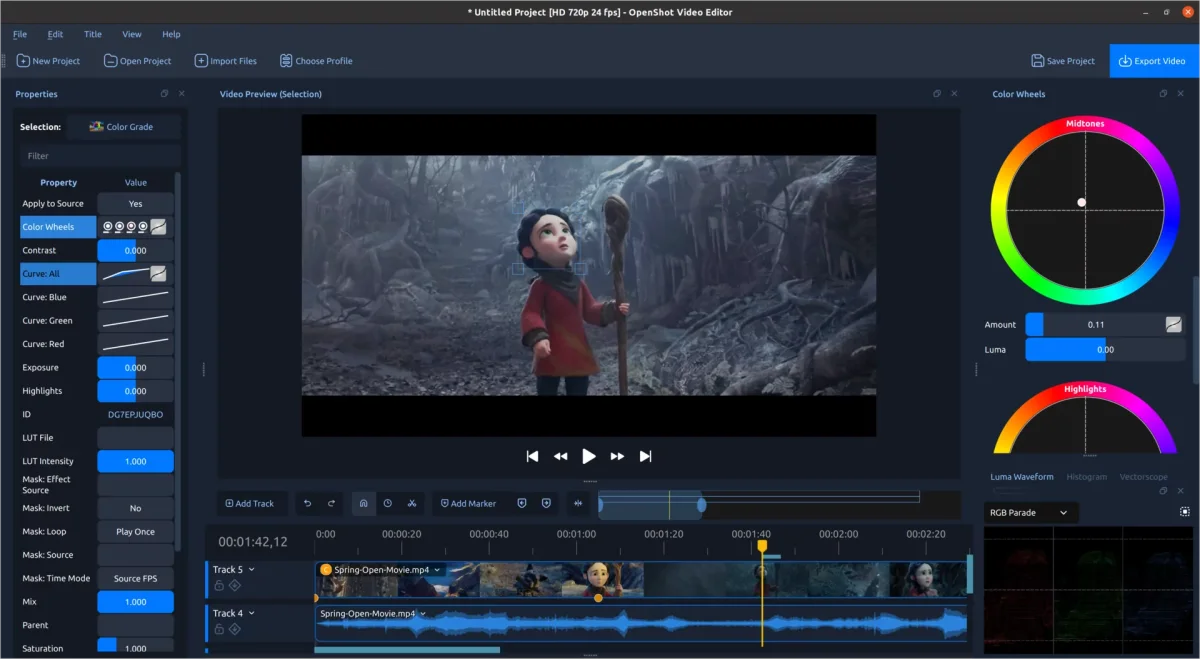
Each scope has a Region tool, which lets users focus on specific areas of the image. For instance, drawing a rectangle around a face allows for isolated analysis of color and exposure. The Vectorscope even features a dedicated skin-tone reference line to assist in maintaining color accuracy for people.
For quick adjustments, the clip menu includes options such as Auto Contrast and Boost Color, enabling users to enact corrective actions without complicated setup processes. The OpenShot User Guide has been revised to include specifics on color correction and grading techniques.
Integrated Screen, Camera, and Audio Recording
OpenShot 4.0 enhances its usability with a new Recording View, making it easier to capture multiple media sources simultaneously. You can record your webcam, microphone, and desktop or screen activity, all within a unified platform.
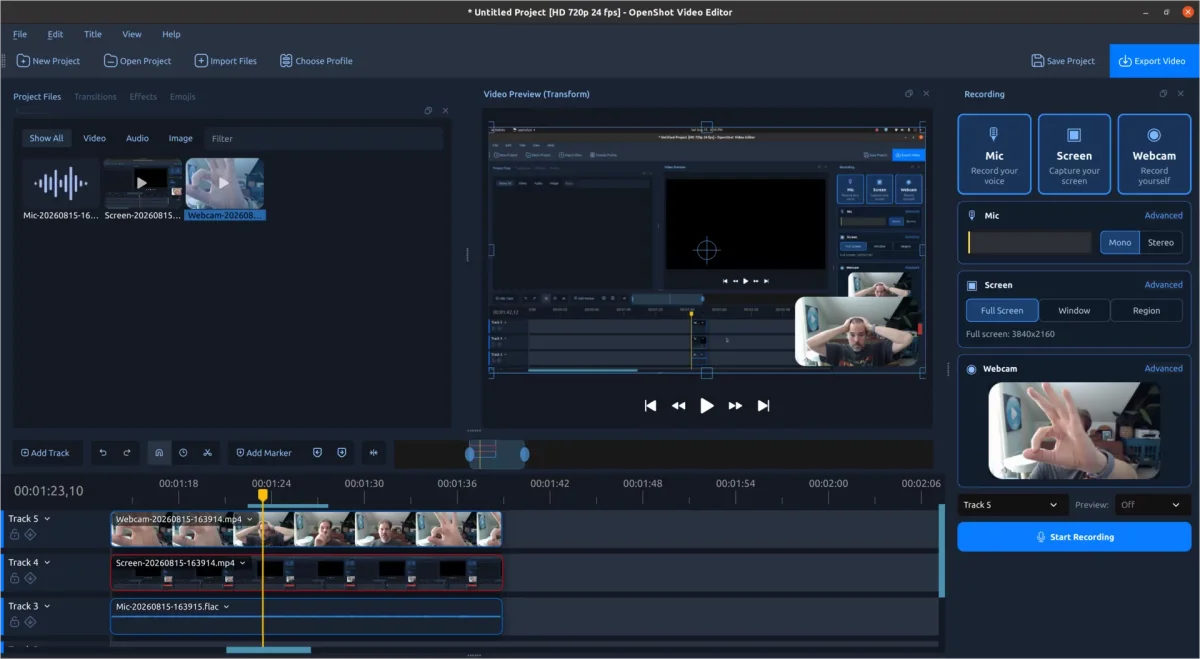
After recording, each source is treated as a separate file and clip within the timeline, allowing easy edits such as trimming mistakes or adjusting audio levels without affecting other recordings.
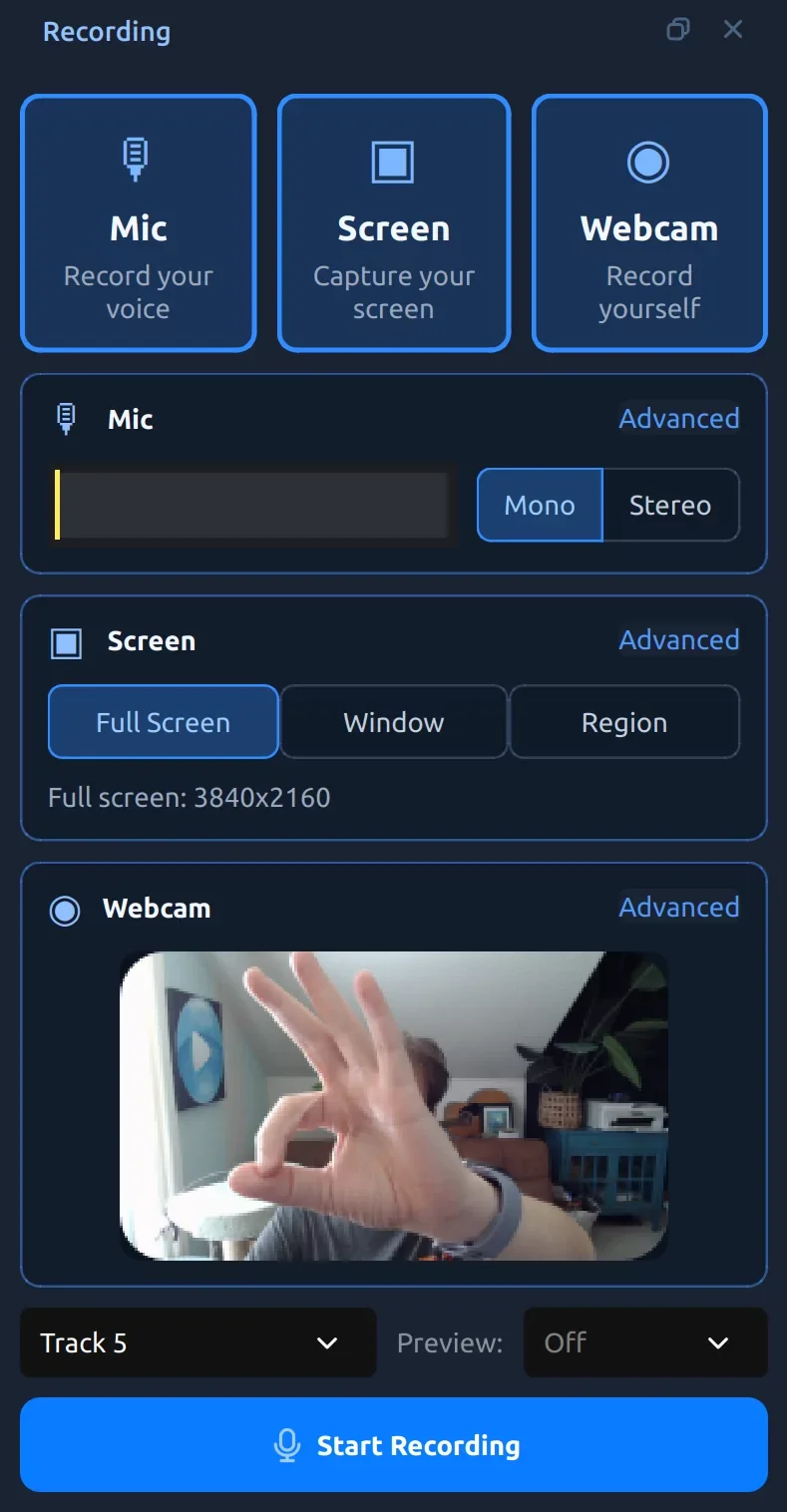
The interface ensures a clean and productive recording experience through real-time feedback, including microphone monitoring and video previews, right before and during recording sessions. Furthermore, users can align pre-existing projects with new audio or webcam recordings, beneficial for enhancing commentary or instructional videos.
The application adapts recording options according to the operating system and hardware capabilities, ensuring a seamless experience whether on Windows, macOS, or Linux with PipeWire.
Ten New Effects for Enhanced Creativity
The latest version adds ten remarkable effects that open new avenues for creative projects.
Audio Visualization Transformations
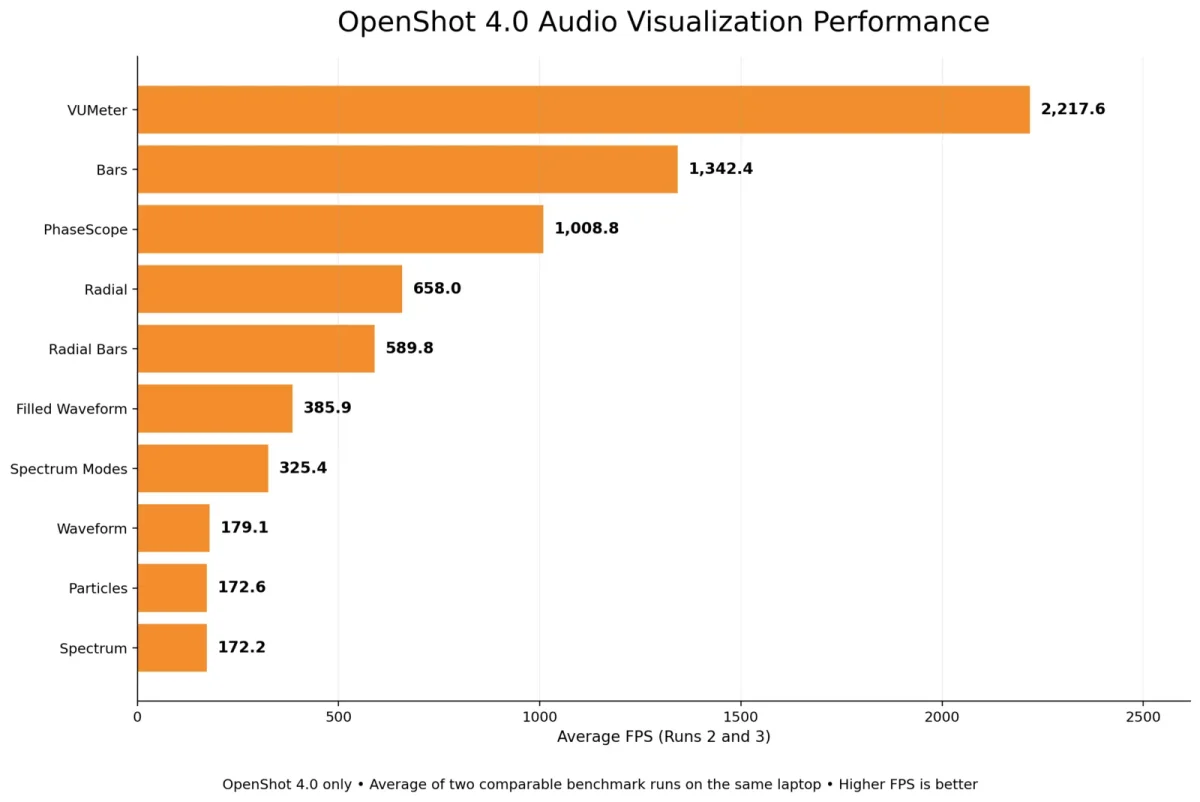
The Audio Visualization effect allows sound to translate into animated visuals, with versatility in presenting audio properties through waveforms, bars, and even radial patterns. Users can adjust color, frequency ranges, and visual style, making it ideal for social media and music-centric videos.
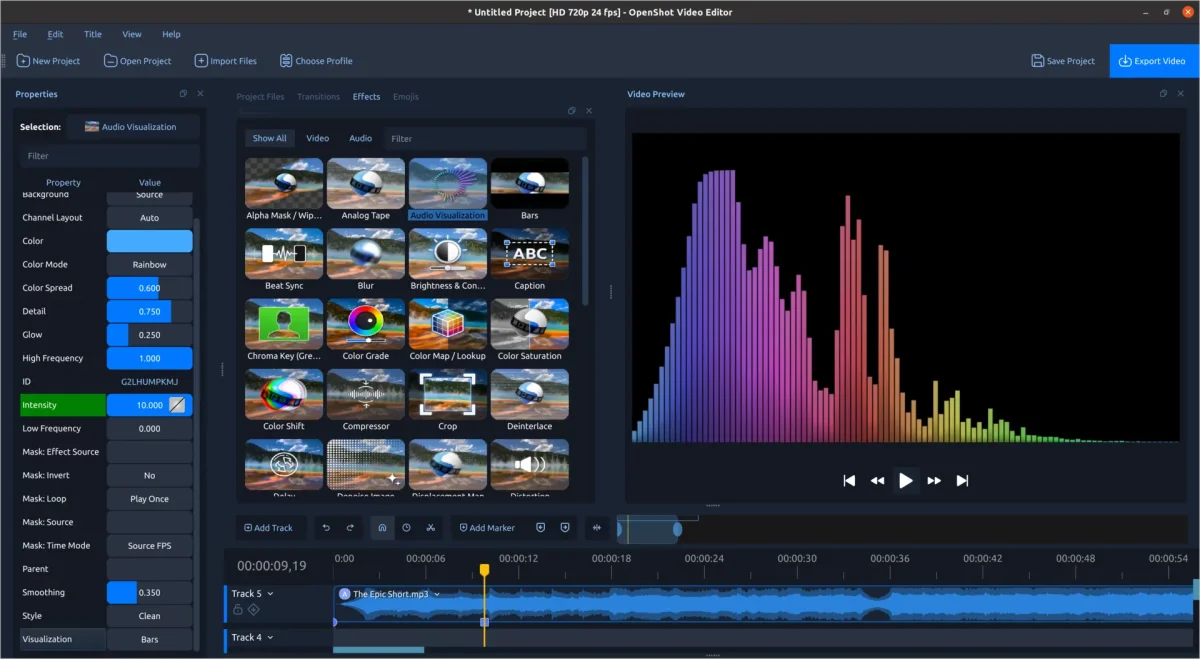
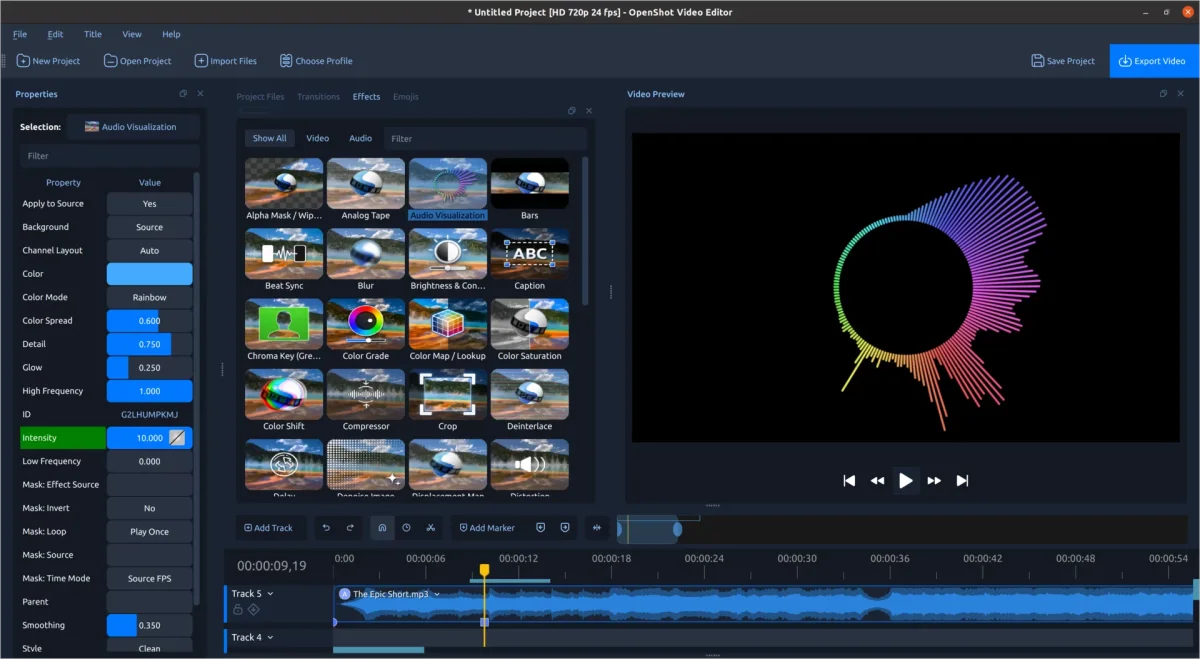
This feature is optimized for smooth animations, performing well above the typical frame rates found in most projects. Testing reveals that even high-demand modes achieve exceeding frames per second rates, enhancing the interactivity of music-related content.
The Beat Sync option reacts to audio cues, enabling colorful layers that sync with beats, facilitating striking video transitions and effects.
New Texture and Style Effects
- Film Grain: Introduces customizable animated films, with numerous pre-sets simulating various classic film styles.
- Denoise Image: Efficiently reduces noise, enhancing clarity without losing critical detail.
- Shadow Effect: Offers flexible drop shadows with customization options for color, opacity, and blur.
- Glow Effect: Allows creators to add halos, flattering text and imagery for dramatic emphasis.
Innovative Visual Techniques
- Displacement Map: Utilizes images or videos to give a warping effect, producing impressive results, like heat shimmer.
- Timer Effect: Creates dynamic countdowns suited for presentations and sporting events.
- Object Mask: Allows for easy creation of animated masks, streamlining the process of focusing on specific subjects.
Dynamic Object Masks Using Local Processing
Removing backgrounds or isolating moving elements no longer requires tedious frame-by-frame adjustments, thanks to the innovative Object Mask feature. Users can outline a subject with positive points while indicating negative areas surrounding it, leading to efficient and effective masking.
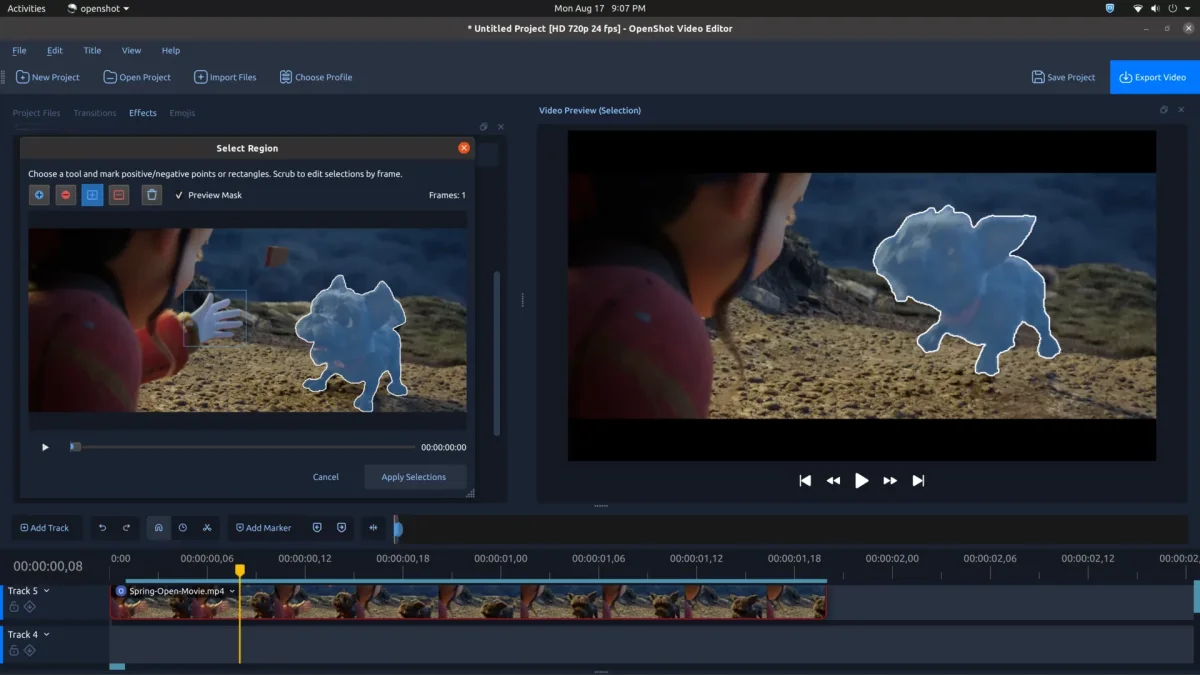
This process entirely operates on the user's computer, using local models that don't require cloud usage. OpenShot supports various free models for efficient identification without compromising privacy or requiring an internet connection.
The completed mask can be utilized in multiple OpenShot effects, making it easier to modify both subjects and backgrounds simultaneously. Notably, enhancements in object detection further improve controls and provide a straightforward platform for animation and compositional adjustments.
A Polished, Native Timeline Experience
A substantial focus on usability in OpenShot 4.0 is reflected in the reworked native timeline, which enhances the overall editing experience with better clarity and tighter control over clip components.
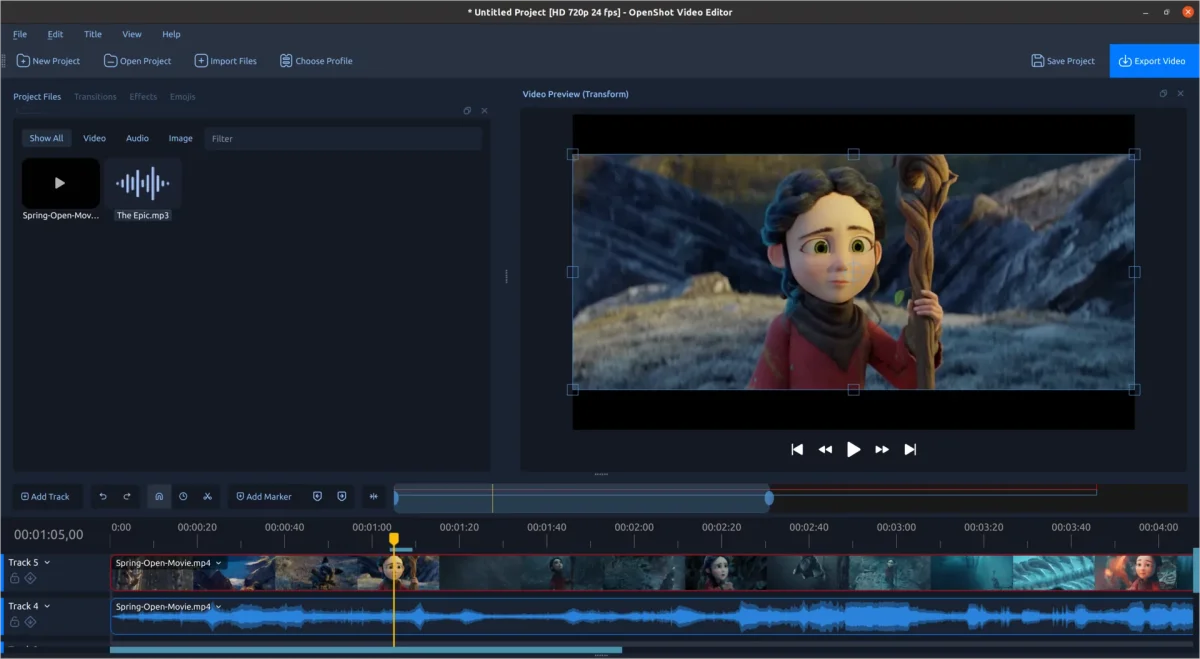
The improved timeline is void of distracting jumps, smoother interactions, and a more organized structure, reducing strain during longer editing sessions. Directly editable timecodes expedite navigation, while improved visibility for clips and transitions bolsters usability.
Keyframe management continues to be refined, offering intuitive adjustments and clearer visualization of animated properties, crucial for adaptive storytelling in video projects.
Increased Efficiency Across Editing Functions
OpenShot 4.0 seeks to maintain creative momentum through performance enhancement throughout all stages of editing. The timeline's efficiency has risen significantly due to reduced processing costs, quicker effect rendering, and overall fluidity when working within the application.
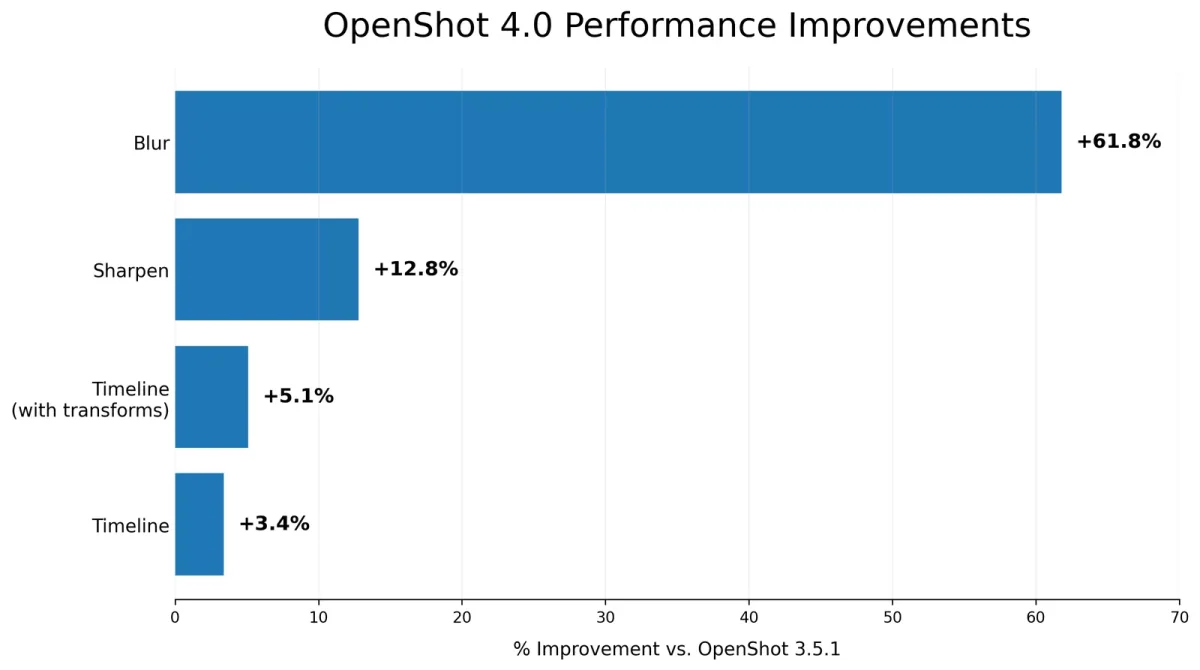
Results from benchmark testing indicated a significant speed increase in effects like Blur, which operates at 61.8% faster than its predecessor. Timeline rendering also shows incremental boosts that cumulatively enhance the user experience significantly. These upgrades create a direct and palpable benefit, especially during intensive editing tasks.
Other enhancements in processing efficiencies are evident in applications like Color Grade, Film Grain, and audio visualization, contributing vital support to users' technical requirements.
Streamlined Menus and Enhanced Workflow
In OpenShot 4.0, the clip menus have been reorganized based on practical editing behaviors, fostering greater accessibility to frequently used options. Grouped under clear headings such as Transform, Look, Audio, and Motion, these menus allow for quicker configurations and efficient updates.
The newly structured Motion menu includes dedicated groups for In, Out, and Camera movements, providing ample presets that make it simple to achieve professional results without complicated setups.
Efforts focus on arranging camera movements to suit various aspect ratios, taking care to design movements that integrate with existing content effectively. Users can enjoy more polished transitions by combining mask effects with movements or blurs.
Quick color options integrate film grains, shadows, and various enhancements with easy adjustments available through the effect properties.
Enhanced Title, Caption, and Export Functionalities
OpenShot 4.0 refines not just the editing, but also the final processes including title creation, captioning, and media export. The editing experience with captions has been upgraded for fluid previews, while titles can now easily be exported as MP4 files.
Improvements in media importing ensure selection order is preserved, optimizing efficiency during large project onboarding. Export presets have also been modernized to cater to current popular platforms like TikTok, Instagram, and others.
A Strong Foundation for Future Development
OpenShot 4.0 integrates a substantial modernization process that enhances usability across the board. By expanding its compatibility with the latest Qt versions, OpenShot is better equipped for various desktop environments, producing a more seamless user experience.
This modernization also establishes the groundwork for future expansions, such as potential support for Android platforms, facilitating exciting new developments for users keen to leverage their existing OpenShot skills on diverse devices.
The release concurrently upgrades the libopenshot core to version 1.0.0, supporting new functionalities and established stability across the editing ecosystem.
Over 100 Improvements and Fixes
Beyond the standout features, OpenShot 4.0 introduces hundreds of smaller tweaks that refine playback, performance, and overall usability of the editor. These enhancements, along with user feedback, showcase a dedicated commitment to continuous improvement.
For developers and users interested in the meticulous details of this release, comprehensive release notes are available on GitHub:
- OpenShot Video Editor 4.0.0 release notes
- libopenshot 1.0.0 release notes
- libopenshot-audio 1.0.0 release notes
Acknowledgements
A heartfelt thanks goes out to Blender and its community of artists for sharing open movie projects that serve as inspiration and test footage for OpenShot's development.
Additionally, a special mention to community member Raffi, whose contributions have greatly enhanced user experience through advocacy and support.
We extend our gratitude to everyone involved in shaping this release through testing, feedback, and development contributions. If OpenShot has aided you in your creation or storytelling, consider supporting the project, as your assistance will facilitate continuous improvements.
Get Started with OpenShot 4.0
OpenShot 4.0 represents a holistic evolution in video editing capabilities, supporting creators with efficient tools for recording, editing, and exporting audiovisual content. Whether you're embarking on your first project or refining a complex video, these features aim to enrich the creative process.