OpenShot 3.5.1 Enhances Editing Speed and Usability with New Features
| Shelf | Cameras & Lenses |
|---|---|
| Date in | |
| Readers | 325 |
OpenShot 3.5.1 improves video editing efficiency with features like Optimize Preview, faster performance, and enhanced AI workflows, ensuring smoother experiences.
OpenShot 3.5.1 brings significant enhancements to video editing, focusing on speed, smoothness, and usability. This update introduces a built-in Optimize Preview workflow for better playback and responsiveness, along with refined timeline functionality and various crucial fixes. With these updates, users can expect a more polished editing environment that significantly improves their workflow.
Highlights of OpenShot 3.5.1
- Optimize Preview: A new built-in proxy workflow that creates or connects optimized preview media for better playback and scrubbing on demanding clips.
- Enhanced Performance: Smarter CPU-aware threading defaults and controls lead to faster media inspection and improved responsiveness in editing tasks.
- Smoother Timeline Interaction: Improved zooming behavior and better multi-selection trimming make it easier to manage complex edits.
- Sharper Previews: Upgraded preview dialogs and autoplay behavior provide better visual feedback during editing sessions.
- Improved AI Workflows: Enhanced ComfyUI tools assist in creating more polished content with depth and reference-image support.
- User Interface Enhancements: Refinements to thumbnail presentation and the addition of a new User Interface Scale setting offer greater adaptability.
- Stability Updates: Numerous fixes enhance performance reliability, addressing issues with timeline scrolling, razor alignment, and media handling.
1. Optimize Preview: Streamlined Editing Experience
The standout feature of OpenShot 3.5.1 is the Optimize Preview function. This workflow is designed to generate lower-resolution preview files, making it easier to edit large, high-resolution projects. Instead of relying solely on full-resolution files for every preview and edit action, users can now utilize these optimized media files. This feature greatly enhances playback, makes the timeline more responsive, and ensures that the editing process feels faster and smoother without compromising the quality of final exports.
The introduction of this feature marks a significant improvement, allowing creators to handle demanding projects with greater ease.
2. Performance Boost with Smart System Scaling
The emphasis on performance improvements in version 3.5.1 ensures that OpenShot better adapts to various hardware configurations. The update includes CPU-aware thread settings and refined thread controls, which enhance overall efficiency. Media inspection processes have been optimized to avoid unnecessary full-resolution decoding, leading to a quicker and more fluid editing experience.
These changes respond directly to user feedback about performance, allowing OpenShot to serve a wider range of systems effectively.
3. Enhanced Timeline Functionality
The timeline, a crucial element of any video editor, has received thoughtful improvements in this update. Zooming behavior has been refined to be more intuitive and keep the playhead centered, making navigation more natural. Varying levels of multi-selection trimming and re-timing have also been enhanced, giving users better control when adjusting groups of clips in their edits.
These enhancements make the timeline feel more consistent and user-friendly, particularly in complex editing environments.
4. Improved Visual Feedback with Sharper Previews
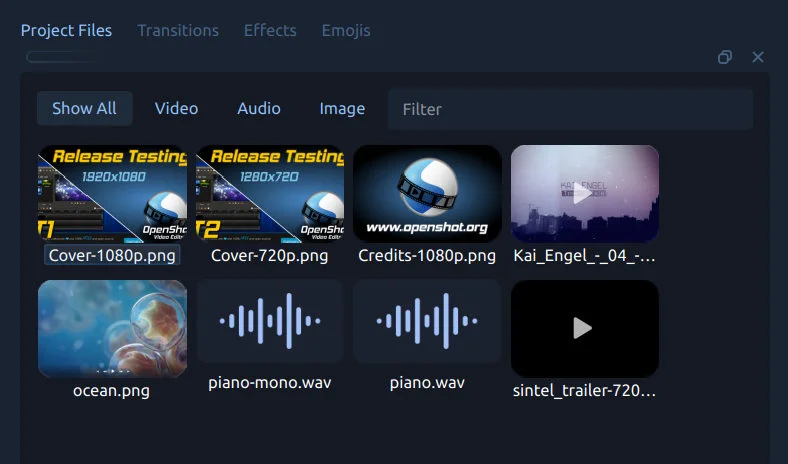
Several advancements have been made in preview-related tools. The opening time for preview dialogs is now faster, and the playback is smoother. OpenShot handles resizing much more cleanly, contributing to a better editing environment. The updated thumbnail generation now presents a clearer and more modern appearance, resulting in a visually appealing and streamlined editing view. Title thumbnails maintain better synchronization after edits, ensuring reliability in media representation.
5. Advancements in AI Workflows with ComfyUI
OpenShot continues to expand its AI-assisted editing capabilities with improvements in the ComfyUI tools, facilitating the Change Video Style workflow. Users will find enhanced controls that now support depth and line extraction, allowing for more sophisticated edits and creative directions.

A video demonstration shows how OpenShot captures and repurposes visual elements from lower-resolution sources, enabling users to achieve high-quality results while managing media effectively.
This release equips users with better tools for stylized and experimental editing workflows.
6. A More Intuitive and Customizable User Interface
OpenShot 3.5.1 introduces several UI enhancements making the software more visually appealing and adaptable. A new User Interface Scale option improves accessibility across various display sizes, catering to the diverse preferences of users. The updates include enhanced translation features and refinement of design elements, such as the timeline and thumbnails, ensuring a consistent user experience.
7. Critical Fixes and Stability Improvements
Beyond new features, OpenShot 3.5.1 contains critical fixes that address stability issues. Updates include corrections to timeline scrolling, razor alignment inaccuracies, and improvements in title thumbnail refresh behavior. This kind of newfound polish increases the reliability of the editor, fostering confidence during daily use.
Significance of OpenShot 3.5.1
The release of OpenShot 3.5.1 stands as a meaningful step in the evolution of open-source video editing solutions. Primarily focusing on enhancing speed and usability, this version makes a significant impact on real-world projects. With improved optimized previews, intuitive timeline interaction, and robust AI workflows, OpenShot facilitates a smoother editing process, allowing creators to shift their concentration back to the art of filmmaking rather than grappling with software limitations.
Support OpenShot and Free Video Editing
If OpenShot has proven helpful in your creative endeavors, consider supporting the project through donations. Contributions facilitate ongoing development, improvements, and the introduction of new features in future releases.
Download OpenShot 3.5.1 now and explore what faster editing, smarter previews, and enhanced workflows can do for your creative projects.
A special thank you to Raffi for his commitment to the community and invaluable feedback throughout the development process.